
CLI
cutcraft exports a file to video, audio, a still or subtitles, checks its layout, reads its timeline back as text, draws a sheet of its frames to look at, and adds media to the manifest.
npm install cutcraft
npx cutcraft <file.tsx> --out <video.mp4|.webm|.mp3|.wav> [--draft] [options]
npx cutcraft <file.tsx> --still <seconds> --out <image.png|.jpg> [options]
npx cutcraft <file.tsx> --check-layout [--safe-zone <zone>] [--subject <x,y,w,h>] [--json] [options]
npx cutcraft <file.tsx> --srt <captions.srt> | --vtt <captions.vtt> [--from <s> --to <s>]
npx cutcraft inspect <file.tsx> [--at <moments>] [--json] [--manifest <file>] [--props <json>]
npx cutcraft look <file.tsx> [--at <moments> | --around <id>] [--without <id>] [--listen <stretch>] [--zones <zone>] [--out look.png] [options]
npx cutcraft look <file.tsx> --motion <stretch> [--step <s>] [--listen <stretch>] [--out look.png] [options]
npx cutcraft where <file.tsx> --at <moments> [--safe-zone <zone>] [--json] [options]
npx cutcraft fonts [--for <role>] [--category <category>] [--sheet fonts.png [--text <words>]] [--json]
npx cutcraft add <media file>... [--manifest <file>] [--id <id>] [--transcript <file>]
npx cutcraft browser install
npx cutcraft skills install [--dir <folder>] [--force]
npx cutcraft --help prints the same list.
Every export draws its frames in headless Chrome. The first one downloads Chrome for Testing into ~/.cache/cutcraft/browsers (CUTCRAFT_BROWSER_CACHE moves it); cutcraft browser install downloads it ahead of time. CUTCRAFT_CHROMIUM names a Chrome or Chromium 153 or later to use instead (The browser it runs in).
Export
| Option | |
|---|---|
--out <file> | Where to write. .mp4 gives H.264 and AAC, .webm VP9 and Opus. .mp3 and .wav hold the soundtrack alone. |
--still <s> | Write the frame at this time instead, to a .png or .jpg --out. It is kept in the frame cache; --no-cache draws it again. |
--srt <file> --vtt <file> | Also write the captions the cut plays as SRT or WebVTT, timed like the export. Without --out, write only them (Subtitle files). |
--manifest <file> | The asset manifest. Without it, see Where the manifest and the media are found. |
--media <dir> | One file per asset id, with or without an extension (podcast.webm, podcast). Without it, the same section says where they are looked for. |
--props <json> | Props for the file's component, over its defaults. |
--from <s> --to <s> | Render only this part of the composition. |
--draft | A render for watching, not keeping: every second frame, each shown twice as long, at half the width and height and the low quality preset. Written beside --out as <name>.draft.<ext> (A draft). Not with --still, --check-layout, --copy or look. |
--tabs <n> | Pages of the browser that render pieces at once. Default 1 (Faster). |
--copy | Copy untouched stretches of a VP9 source into a VP9 export without re-encoding them (Faster). |
--codec <name> | avc (the default in MP4), vp9 (the default in WebM), or av1 in either. A codec the container cannot hold (VP9 in MP4) is an error. |
--bitrate <bps> | Video bits per second. Default: about 0.1 per pixel per frame. |
--quality <preset> | very-low, low, medium, high or very-high: the encoder picks the bitrate for the size and codec. In place of --bitrate. |
--keyframe <s> | Seconds between keyframes. Default 2. |
--frame-timeout <s> | Seconds one frame may take before the command fails, naming the frame and the step it was in. Default 60 (When a frame never finishes). |
--silent | No soundtrack. |
--font Name[:weight[:style]]=file | A font for this export beyond the ones the file declares (Fonts), repeatable. TTF, OTF, WOFF or WOFF2. |
--continue | Draw the grey placeholder for an asset that cannot be read, instead of stopping. |
--import <spec> | A module the file may import beyond react, zod and @cutcraft/kit, repeatable: three, or name=specifier for a package or a path relative to the file. |
--quiet | No progress output. |
Layout check
| Option | |
|---|---|
--check-layout | Report every overlay, and every part a layer's code names with data-name, that leaves the frame or the safe zone, or covers the captions or the subject, at its line in the file. Writes no file. |
--safe-zone <zone> | tiktok, reels, shorts, title-safe (the default) or action-safe, or top,right,bottom,left fractions. |
--subject <x,y,w,h> | Where the subject is, as fractions of the frame, for footage whose manifest has no subjects. |
--step <s> | Seconds between samples. Default: every frame. |
--json | Print the report as JSON. |
Checking the layout explains the rules and the output.
Where
cutcraft where video.tsx --at <moments> prints where each thing on screen is at each moment: every overlay, the captions, and every part a layer's code names with data-name. Each row gives the thing's ink as a box in pixels, whether it is in the frame and in each safe zone, and what it overlaps.
| Option | |
|---|---|
--at <moments> | The moments to report, comma-separated, written as for inspect. Required. |
--safe-zone <zone> | The zone to hold each thing against, as for the layout check. Default: tiktok, reels and shorts for a portrait video, title-safe for any other. |
--json | Print the report as JSON: per moment, each thing's id, kind, box, inFrame, zones and over. |
--manifest, --media, --props, --font, --import, --frame-timeout | As for an export. |
Where things are shows the output.
Inspect
cutcraft inspect video.tsx prints the timeline the way an editor reads it: each track and its elements with their seconds, the words each clip plays, effects, keyframes and cuts. It runs the resolver only, so it starts no browser, needs no media files and answers at once. It is how an agent, or a script, reads a cut back.
video.tsx  1920x1080  30 fps  25.60 s (768 frames)  0 errors
track main (sequence)
     0.00–5.20     clip        hook  asset:founder 5.60–10.80  words 12–23 "Small software still deserves a real cloud It s…"
     4.80–5.20     transition  x1  crossfade (hook → broll)
     4.80–10.80    clip        broll  asset:product 6.00–12.00  keyframes: transform.scale.x, transform.scale.y
track overlays (sequence)
     0.40–3.20     title       title  "Shed"  anchor start +0.4
cuts: 4.80 hook→broll (x1), 10.80 broll→demo
--at says what is on screen and heard at each moment instead: the elements from the top of the picture down, each effect's params and the transform after keyframes, each sound's gain, the word being said and the caption.
$ npx cutcraft inspect video.tsx --at word:14,x1
word:14  1.00 s  frame 30  (word 14 "still" in hook)
  seen: title tagline  4% through  "A cloud for small software"  transform position.x=0 position.y=300
  seen: title title  21% through  "Shed"  transform position.x=0 position.y=140
  seen: clip hook  19% through  source 6.60 s
  heard: hook (asset:founder) gain 1.00
  heard: bed (asset:music) gain 0.05
  said: word 14 "still" in hook
caption: "Small software still deserves a real cloud."| Option | |
|---|---|
--at <moments> | The moments to describe, comma-separated. Without it, the whole timeline. |
--json | Flat rows instead of text: composition, tracks, elements, effects, keyframes, words, cuts and errors, each row with its seconds and its frames; with --at, an at array too. Made for jq or a short script: cutcraft inspect video.tsx --json | jq '.cuts'. |
--manifest, --props, --import | As for an export. |
A moment is written the way the file is written, or as plain time:
| Moment | Meaning |
|---|---|
4.5 | Seconds of the finished video. A bare number is always seconds. |
90f | Frame 90, at the composition's frame rate. |
2..6/0.5 | Every half second from 2 to 6; 2..6 is its two ends. Frames work too: 0..90f/30f. |
hook, hook.start, hook.mid, hook.end | An element by its id: its middle, its start, or the last frame it is on. |
x1 | A transition by its id: the last frame before it and the first after it. |
word:14, word:14.end | Where the finished video says that word. When two clips play it, name one: hook@word:14. |
shot:1, silence:2 | The same for a shot or a silence, with .end and clip@ too. |
marker:intro | A marker. |
Every answer gives the seconds, the frame and what the moment is, so a moment found by time leads back to the element or the word to edit. A moment that cannot be found is an error that says why, and the command exits 1; the others are still printed.
Look
cutcraft look video.tsx draws many frames in one browser start and lays them out on one contact sheet, each cell labelled with its seconds, its frame and what it shows. One look costs about what one --still does, however many frames it holds, so it is the way to check a cut by eye: an agent reads the one image.
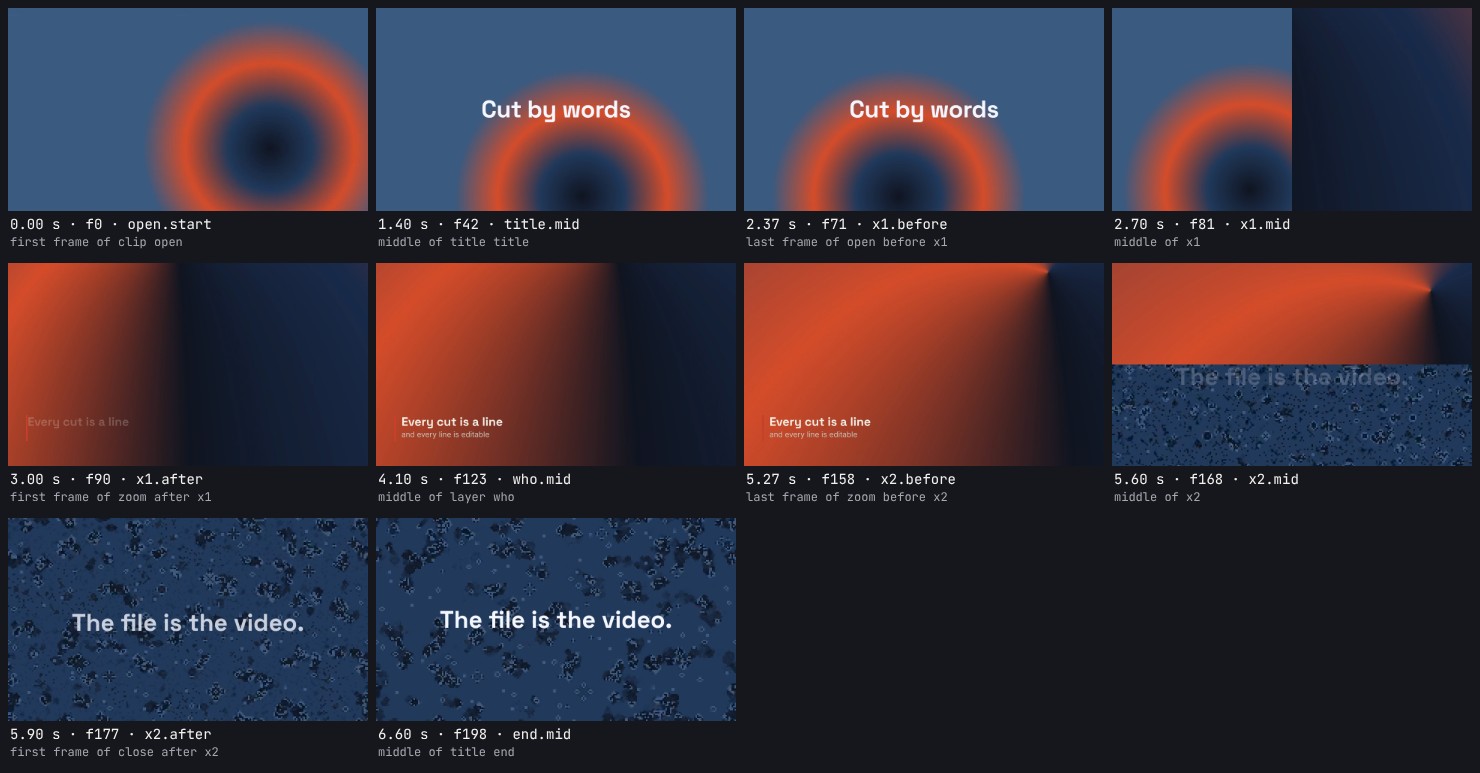
With no moments named, it picks the ones an editor skims: the first frame of each clip, both sides and the middle of every transition (or the two frames either side of a hard cut), and each overlay once. The frames are drawn by the export, so each is the frame the export would write.
It prints a legend as JSON, one entry per cell, so a frame found by eye leads back to the element or word to edit:
{
  "sheet": "/work/look.png",
  "width": 1960,
  "height": 974,
  "columns": 4,
  "cells": [
    { "index": 0, "row": 0, "column": 0, "label": "open.start", "time": 0, "frame": 0,
      "about": "first frame of clip open", "seen": ["open"] },
    { "index": 1, "row": 0, "column": 1, "label": "title.mid", "time": 1.4, "frame": 42,
      "about": "middle of title title", "seen": ["title", "open"] }
  ]
}| Option | |
|---|---|
--at <moments> | The moments to draw, comma-separated, written as for inspect: hook.end,x1,word:14,2..6/0.5. |
--around <id> | Five moments across one thing instead. A transition: the frame before it, its first, middle and last frame, and the frame after. Any other element: its first frame, half way in, its middle, half way out and its last frame. |
--without <id> | Each frame twice, side by side: as written, and without one effect, one <Adjustment> (all its effects) or one overlay (a title, a shape, an SVG, a sticker, a layer, the captions). A clip cannot be left out: that would move the cut. |
--motion <stretch> | A strip of small frames at even steps across a stretch, to read a move (Motion). Not with --at, --around or --without. |
--step <s> | With --motion: the seconds between frames. Left out: the step that gives twelve frames. |
--zones <zone> | A safe zone drawn over every cell, with an outline round each thing (With the zones drawn). Not with --without. |
--listen <stretch> | The sound of a stretch, drawn under the cells: all, a range of times such as 2..6 or 60f..180f, or an element's id for the time it is on (Listening). |
--out <file> | The sheet, a PNG. Default look.png. |
--cell <px> | The width of a cell's picture. Default 480. In a --motion strip: 240, or 180 for a portrait video. |
--columns <n> | Cells in a row. Default up to 4, and up to 12 in a --motion strip. |
--frames <dir> | Also write each cell's frame at full size there, as PNG; the legend names each file. |
--no-cache | Draw every cell again (The frame cache). |
--manifest, --media, --props, --font, --import, --continue, --frame-timeout | As for an export. |
Around a cut. --around follows one thing through: here a wipe, from the frame before it to the frame after. With --without title each moment is drawn twice, so the title's exit can be judged against the cut beneath it.
npx cutcraft look edit.tsx --around x1 --without title --columns 6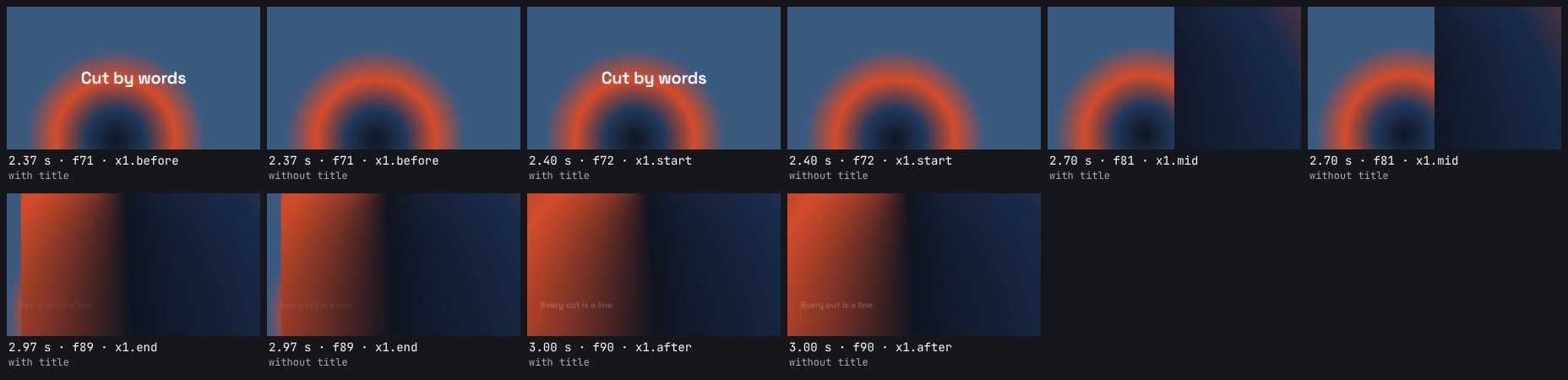
With and without. Naming an effect or an <Adjustment> shows what it does to the same frame. Here a grade that starts half way through the shot: at 1 s it changes nothing, at 2.5 s the graded frame is warmer and brighter.
npx cutcraft look colour-grade.tsx --at 1,2.5 --without grade
Motion
A still says where a thing is, not how it gets there. --motion draws one short stretch as a strip of small frames at even steps, read left to right, each labelled with its time in seconds. The stretch is a range of times such as 0.3..1.3 or 9f..39f, or an element's id for the time it is on.
npx cutcraft look one-pixel.tsx --motion 0.3..1.3
Without --step the strip has twelve frames, fewer when the stretch is shorter than twelve frames: no frame is shown twice. --step 0.05 sets the seconds between frames, and --columns wraps a long strip into rows. A strip holds at most 64 frames. The legend gains the stretch and the step:
"motion": { "from": 0.3, "to": 1.3, "step": 0.091 }With the zones drawn
--zones draws a safe zone over every cell: what is outside it is shaded, and each overlay, the captions and each part a layer's code names is outlined, lime inside the zone and red where it leaves the zone or the frame. It takes the zones --safe-zone takes. A layer with named parts is drawn as its parts; what fills the frame is left out.
npx cutcraft look one-pixel.tsx --at 2.6,22,53,84 --zones tiktok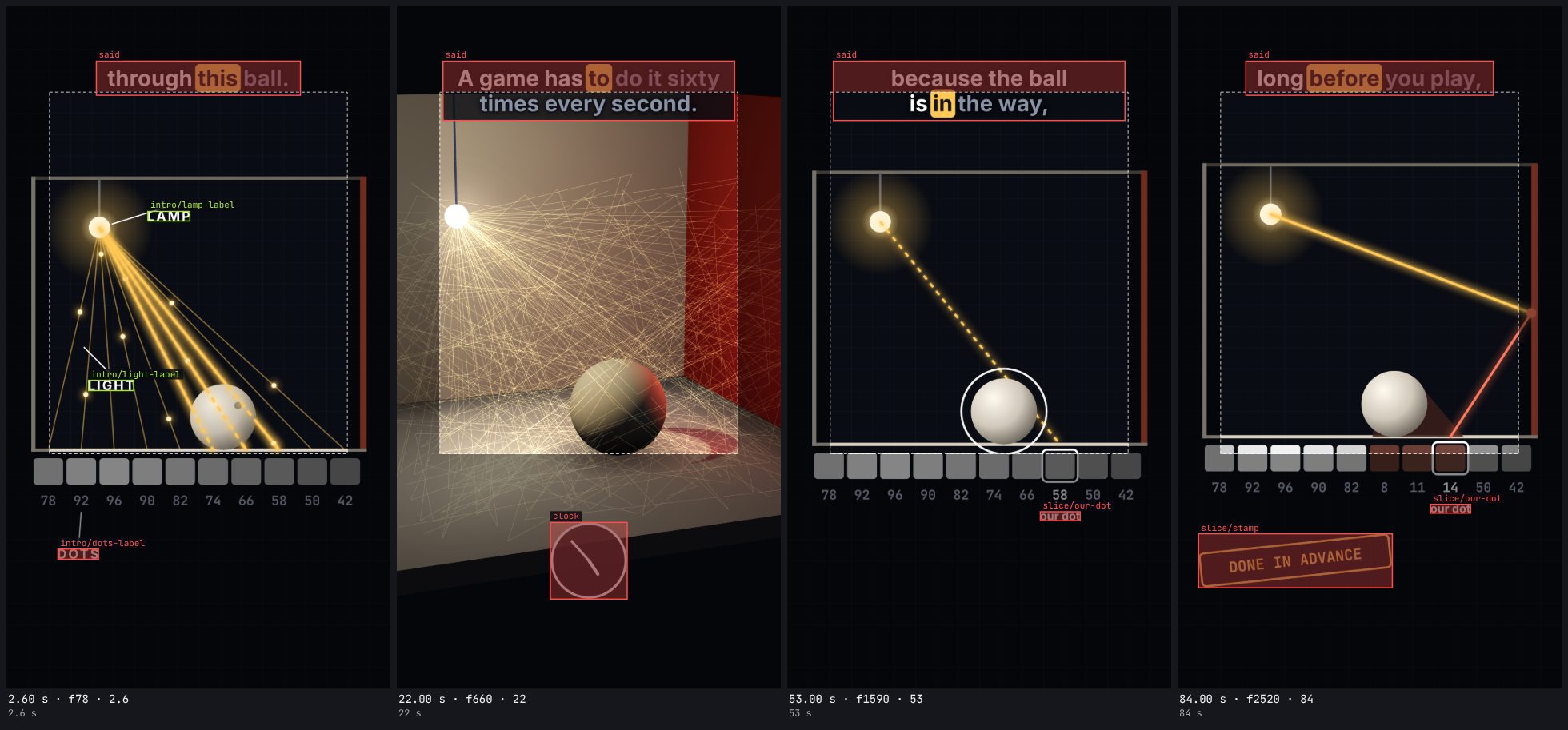
The legend's cells gain things, the rows cutcraft where prints for that moment, so the picture and the numbers come from one command. In a --motion strip the outlines are drawn without their names, as the cells are too small for words. --zones is not for use with --without.
Listening
A picture says nothing about the sound, so --listen adds a strip for it under the cells. The strip is the mix an export makes, after every volume, fade and duck, measured before the export clamps it to full scale: its level over time on a decibel scale from -60 dBFS to full scale, a time scale beneath it, and each word of the transcript where the cut says it. In each column the dim bar is the loudest sample and the bright bar is the average level. Silent stretches are shaded.
npx cutcraft look video.tsx --at 1,3,5 --listen all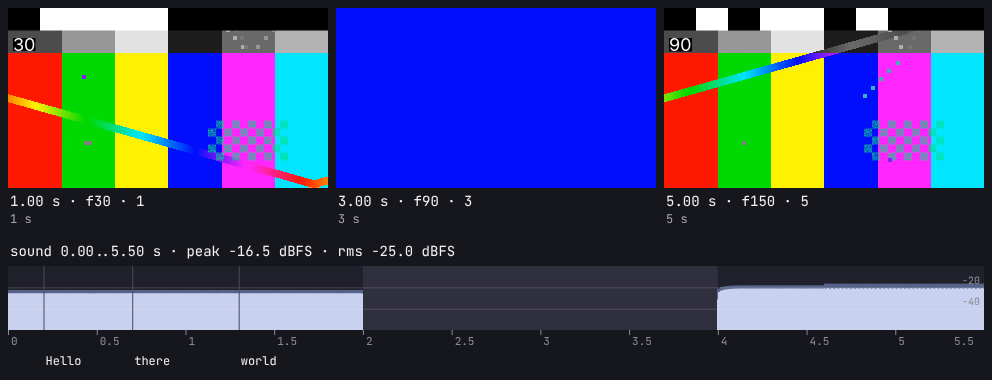
The legend carries the same as numbers, so a check needs no picture:
"listen": {
  "from": 0,
  "to": 5.5,
  "peakDb": -16.5,
  "rmsDb": -25,
  "lufs": -24.1,
  "truePeakDb": -16.4,
  "clipped": 0,
  "clippedAt": null,
  "silences": [[2, 4]],
  "words": [{ "i": 0, "text": "Hello", "start": 0.2, "end": 0.6, "clip": "bars" }],
  "strip": { "x": 8, "y": 240, "width": 976, "height": 132 }
}
peakDb is the loudest sample of the stretch and rmsDb its average level, both in dB relative to full scale, and both null when the stretch is silent. lufs is the integrated loudness of the stretch (ITU-R BS.1770, the measure streaming services and broadcasters set their targets in), and truePeakDb the peak of the wave between its samples as well as on them.
The export clamps the mix to full scale, which is heard as distortion. A peakDb above 0 is sound it will cut off: clipped counts the samples above full scale, clippedAt is the time of the first, and look and render both print a warning. Lower a volume or duck the music until it is gone; nothing limits the mix for you. silences lists every stretch of at least 0.3 s that stays below -50 dBFS: a gap where the music should carry on, or a clip whose sound is missing. The words are the ones the cut plays inside the stretch, at the times it plays them.
The strip is kept in the frame cache under a key of the whole file and every media file it plays, since any line of the file can change the mix. The same file is not mixed twice; any edit mixes it again.
A sheet holds at most 64 cells. A moment that cannot be found is reported and the command exits 1, after drawing the others.
The frame cache
look and --still keep what they draw in .cutcraft/cache, beside the file. Each frame is kept under a key made from everything that decides its pixels: the elements on screen at that time with their resolved props, the media files they read (by size and modified time), the composition's settings, the fonts, and the version of CutCraft and of Chrome. So after an edit only the frames the edit changed are drawn again, and a look whose cells are all kept starts no browser and answers in about a second. The legend's cached says how many cells were read back.
- Trimming the last clip leaves the frames of the clips before it as they were. Changing a title's words redraws only the frames it is on.
- A frame that free code draws (a
<Layer>,<Motion>or<Three>, or an effect the file declares) is keyed by the file's whole text too, since that code can read anything in it. Code brought in with--importis not seen: after changing such a module, pass--no-cache. - A frame drawn with a placeholder for media that could not be read is not kept.
The folder is safe to delete, and belongs in .gitignore.
Fonts
cutcraft fonts [--for <role>] [--category <category>] [--sheet fonts.png [--text <words>]] [--json]Lists the fonts to choose from, without a file: the bundled families (starred, used by name) and a short list from Google Fonts (declared with googleFont()). Each line has the family, its category, its weights, what it suits and how it looks.
| Option | Does |
|---|---|
--for <role> | Only families that suit headline, body, captions, numbers or accent |
--category <name> | Only sans, serif, slab, condensed, display, handwriting or mono |
--sheet <image> | Also draws the listed families as one image, three to a row, each setting the same words in its heaviest weight and its regular one. .jpg writes a JPEG, anything else a PNG |
--text <words> | The words the sheet sets. Default: Make It Move 2026 |
--json | Prints the entries as JSON: family, source, category, weights, italics, roles, feel, pairs |
The sheet is drawn in Chrome like any frame. The first time, Google's faces are downloaded into the font cache (~/.cache/cutcraft/fonts), so it needs the network once. See Choosing a font.
Exit codes
| Code | |
|---|---|
| 0 | Done. |
| 1 | An error, such as a missing asset, a file that doesn't load, or a moment inspect or look cannot find. |
| 2 | Wrong arguments; the usage text is printed. |
| 3 | The layout check found issues. |
Where the manifest and the media are found
Every command that reads a video file needs its manifest. It takes the first of these:
- The file given to
--manifest. - The
manifestthe video file exports. cutcraft.jsonin the video file's folder, or in the nearest folder above it that has one.manifest.jsonin the video file's own folder. This is the older name. Folders above are not searched for it, because other tools keep a file of that name.
When none is found, the error lists the folders that were searched. One cutcraft.json at the top of a project serves every video file in the folders below it.
Without --media, each asset's file is looked for in the video file's folder, then in the folder of the manifest file, then in media/ beside the manifest file. With --media, only that folder is searched.
project/
  cutcraft.json
  media/talk.mp4
videos/launch.tsxnpx cutcraft videos/launch.tsx --out launch.mp4Adding media
cutcraft add talk.mp4 writes the media file's entry into the manifest. It reads the kind, length, size, frame rate and sound from the file itself, and the words from a transcript with the same name in the same folder: talk.json from Whisper or ElevenLabs first, then talk.vtt, then talk.srt. Running it again refreshes the entry and keeps the fields it does not write. See Getting a transcript. A .cube file is added as a LUT (kind lut) after it is checked, for <Effect type="lut">.
| Option | |
|---|---|
--manifest <file> | The manifest to write, created when missing. Without it, the nearest cutcraft.json from the current folder upward is updated. If there is none, a manifest.json already in the current folder or beside the media is updated, and otherwise cutcraft.json is created in the current folder. |
--id <id> | The asset id. Default: the file name without its extension. One file only. |
--transcript <file> | A transcript other than the one beside the media. One file only. |
The agent skill
cutcraft skills install writes the agent skill that ships with this version of the CLI into .claude/skills/cutcraft in the current folder, where Claude Code reads a project's skills. The skill then teaches the commands and options of the CLI you have installed. It records what it wrote in .cutcraft-skill.json in that folder; run it again after upgrading and it replaces the folder. A folder with files changed or added since then, or one it did not write, is left as it is, and the command says which files, unless --force is given.
| Option | |
|---|---|
--dir <folder> | Where to write the skill, for an agent that reads skills from somewhere else. Default: .claude/skills/cutcraft. |
--force | Replace the folder even when it has edits, or was not written by this command. |